Update1 - Due to paid service by phpmyadmin(clound db provider for the project), the deployed link for the application will run from this point. Kindly add your own db configuration in the /database/config.js file. Thank you.
Read count system consists of a set of stories that are accessible by multiple users. Its shows count of all the viewers that have visited a story alongside the live viewers that are currently reading the story. visit the website
It is a simple website consisting of namely 4 pages
- Signup Page - It takes up user's first name, last name, email and password
- Login page - It takes up user's email and password
- A page showing the collection of all stories - consists of all the stories
- A page to display a particular story - consists of the story title, story description, total viewers count and live viewers visiting count
- Nodejs as backend framework
- expressjs as nodejs web app framework
- body-parser for auto parsing of json/urlencoded data
- bcrypt for hashing the password
- Reactjs as frontend library
- redux for storing state of user
- socket.io for reading live counts
- csurf for restricting cross origin triggering
- mysql as database
- Sequelize ORM for establishing connection with the database
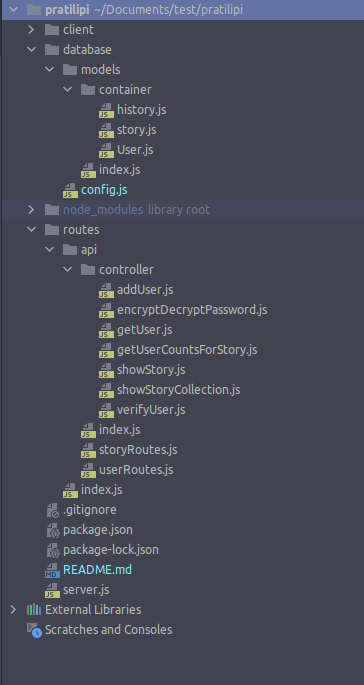
The Project consist of multiple sub-directories, and a main server.js file that is used to trigger the application.
database - consists of a model directory, and a config file. Config file contains the configuration for connecting to the mysql database and Sequelize ORM.
Further the model directory is sub divided into a container directory, and an index.js file. The index.js file creates a connection with the db using sequelize by creating different models that are introduced in the container directory.
There are 3 models in totality namely history, story and user.
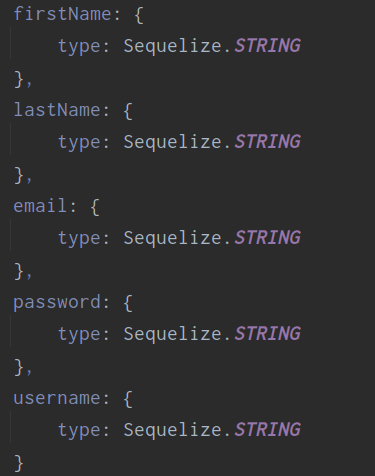
- User model contains the user data structure
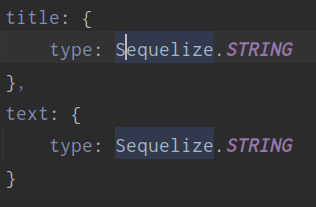
- story model contains the story details structure
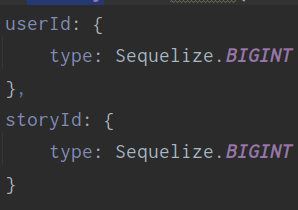
- history model contains the userId and storyId as foreign keys to keep track to visitors to a story
routes - this consists of an api directory, and an index.js file. It redirects to the /api/index file if the request route has /api in it in order to handle further api requests.
Further in api directory, the index file consists of 2 redirection, one for /user and the other for /story. The user route consists of all the that are related to any sort of user activity. Similarly, the story route consists of all the routes that are related to story accessing.
The userRoutes file consists of 2 routes. /signup route is used for signing up the user. The password fetched from the user is encrypted using and then saved into the database. The /login route is used for user authenticity.
The storyRoutes file consists of 2 routes, /getStory/:userId/:storyId route for fetching a single story and populating the history table with the user id corresponding to the story id,
the other one being /collection route to return an array of collection of all the stories
Now, the controller directory consists of all the logic that are used up in other routes.
-
addUser -> It first checks if the route has received any data or not. if not then it sets
successto false and responds with a messagePlease provide valid data or No Data provided. Else, a new user is created using try-catch. If User gets created then an object is returned withsuccessset totrueanddataattribute consisting of the user data else an object is returned withsuccessis set tofalseand a message with the error message. -
encryptDecryptPassword -> contains two methods, on for hashing the password and the other for comparing the hashed password with user input.
-
getUserCountsForStory -> Has a single method that fetches user count for a single story. if the query is successful then, an object is returned with the parameter
successset to true and thedatahaving the counts of past visitors. If query throws an error, then, thesuccessroute is set tofalseand the error is thrown out. -
showStory -> It first checks for valid arguments. If present, then, first the history table gets populated with the userId and story id provided and next the
getUserCountsForStorygets called to fetch the visitors count for the particular story. And then, the story is fetch using the story id from the story table returning the story details and the visitors count for the story. -
showStoryCollection -> returns the collection of all the stories.
-
verifyUser -> First check if credentials is being provided. if yes, then a query is made to fetch the user from the database with the email provided. If email is incorrect then
successis set tofalseand a messageInvalid Email Id, Please enter the correct email...is returned. If not, then the password gets compared with the hashed password that is present in the database corresponding to the email id. Again if password is incorrect , thensuccesis set to false and a messageIncorrect password, Please enter the correct password...is returned. Else if everything goes right, then,successis set totrueand the user object gets returned.
- For https, run
git clone https://github.com/samridhharshit/Read-Count-System.gitand for ssh rungit clone git@github.com:samridhharshit/Read-Count-System.git - cd into the project directory and run
npm install - again cd into the client directory and run
npm install - move out to the root directory and then run
npm run devto fire up the project.