Lean Software Development course project that determines the user's current state by processing the video feed and mouse/video signals.
User interface is implemented as a web page. User can adjust FPS of the webcam, timer control as well as turn off/on mouse, keyboard and video tracking. In addition, user can also change camera that is being used. Web page shows user state based on keyboard&mouse input and video feed.
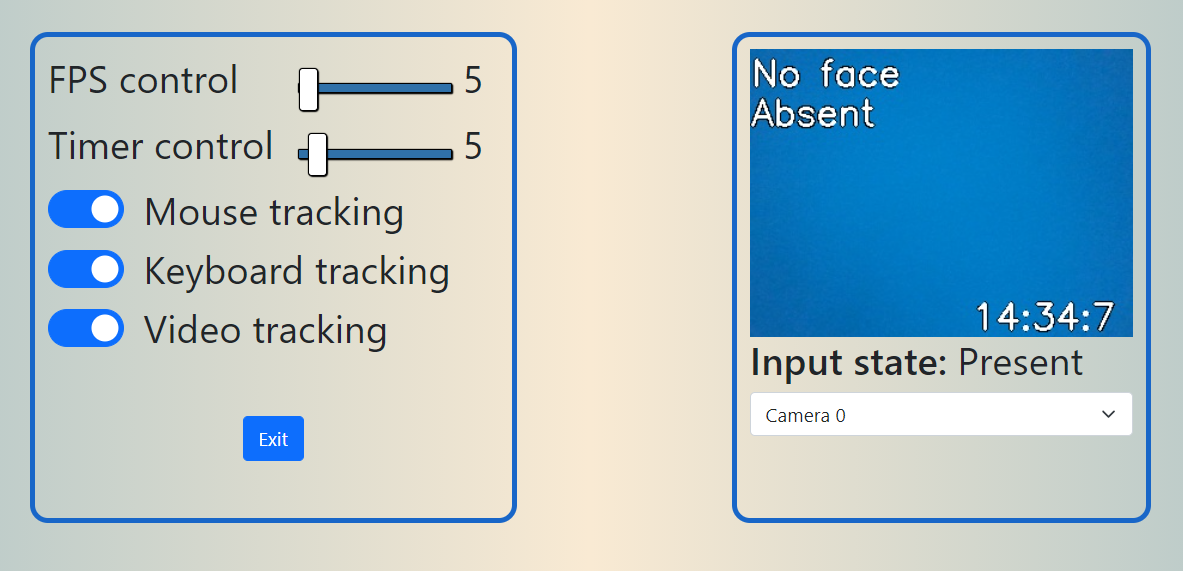
The end product of the program is the sqlite database that stores information about user state(based on webcam feed and user keyboard&mouse input) and gifs that shows user in transition state.
To create binaries for Windows use the following:
pyinstaller main.py --noconsole --onefile --add-data "GUI;GUI" --add-data "models/frozen_graph.pb;." --add-data "GUI/200.gif;." --add-data "models/res10_300x300_ssd_iter_140000.caffemodel;." --add-data "models/deploy.prototxt.txt;." --exclude-module tensorflow --hidden-import=pynput
For Linux:
pyinstaller main.py --noconsole --onefile --add-data "GUI:GUI" --add-data "models/frozen_graph.pb:." --add-data "GUI/200.gif:." --add-data "models/res10_300x300_ssd_iter_140000.caffemodel:." --add-data "models/deploy.prototxt.txt:." --exclude-module tensorflow --hidden-import=pynput
For additional details about implementation of internal packages, check the readme file in folder with the package.
Vitaliy Korbashov (Leosimonetti)
Mihail Olokin (nikololiahim)
Ruslan Muravev (supersloy)